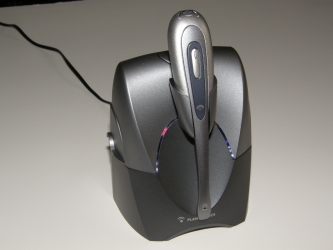
The bottom of the base will have a white sticker starting with “B” for base. This is followed by a letter representing the Month (A=January, B=February…) and a number representing the Year (05=2005).

The bottom of the base will have a white sticker starting with “B” for base. This is followed by a letter representing the Month (A=January, B=February…) and a number representing the Year (05=2005).
I have a cs50 system and the ear piece no longer lets me answer the phone. Could the battery be dead and can I get a new battery???
thank u
If the battery has gone out in the headset, it would typically have been wearing down quicker during the day, not holding a charge as long as it used to. Also you would normally get random beeps in the headset throughout the day as the battery was wearing out. Depending on the headset model, it may have a replaceable battery. For instance the CS50, CS55, CS351N and CS361N have a replaceable battery, however the 510S, CS70, CS70N, WO100 and WO200 does not have a replaceable battery. It just depends on which model you have. If your headset did not exhibit the common traits that were described, then you may want to do a “reset” on your system or “re-pair” your headset so that it is communicating with the base unit, of course check the cables and the compatibility dial to make sure that it didn’t get changed by mistake.
I have a cs50 usb headset.
All of the sudden I can not answer a call from the button on my headset. How can I fix this?
Check the software program being used to make sure that none of the settings have changed, because if the button is activating the headset but just not letting you answer and hang up remotely, then at least the headset is working. The other suggestion would be to do a “reset” or “re-subscribe” the CS50-USB system, here is a link for the reset instructions.
https://www.headsetsdirect.com/articles/how-to-subscribe-or-pair-your-plantronics-cs50-wireless-headset-to-the-charging-base/
I would like to know if the CS55 is compatible with a Nortel Key Telephone system?
Yes, the CS55 is compatible with most Nortel phone models (“Key system” or not). Most Nortel phones will have a dedicated headset jack, however the headset jack is typically used for corded headsets, the wireless systems should be plugged into the handset receiver jack. If you want one touch remote answering, you will also need to get the optional HL10 Handset Lifter which will stick onto your phone and lift / lower the receiver for you when you press the button on the headset. If you do not get the optional HL10 Handset Lifter, you usually need to lift your receiver, set it off to the side, and then hang it up after each call. The HL10 Handset Lifter will also include an accessory kit which will be needed for some Nortel phone models that have a curvature on the left side of the phone, the accessory kit includes an extender arm to reach over a little farther to grab the handset receiver and also a little ring detector which sticks on top of the telephone speaker grill to pick up the ring from the phone and beeps in the headset for an incoming call.
If I purchase three units for the same office, will they interfer with each other?
A few wireless units together in an office will not interfere with each other. With most of the Plantronics wireless headset systems, such as the CS55, CS70N, CS351N, CS361N, WO100 and WO200, you can usually install around 38 units in an office. However if you get the Plantronics 510S Bluetooth system, you can only install around 7 units within range of each other in an office.
[…] Locating the Plantronics wireless headset CS50, CS50-USB, CS55 … […]
The Plantronics CS55 is easy to setup, works with most phones, provides great distance and talk time and comes with two wearing styles. Customers purchases more of them than all other models combined.
Ever since I bought my CS55 and lifter I have had problems. The unit has a delayed response before the unit activates. And then most of the time the lifter will only lift half way and i will not get a connection. When I pust the button again, it will finally fully lift to the point that the connection is made. But by then the call is lost. I have replaced the batteries twice with the same rersults
It sounds like the lifter may be the problem. Try replacing/exchanging the HL10.