Plantronics CS70/CS70N – How to subscribe or pair your Plantronics CS70/CS70N Wireless Headset
How to subscribe or pair your Plantronics CS70/CS70N wireless headset to the charging base
The CS70 and CS70N Plantronics wireless headsets and charging base unit are originally subscribed or paired to each other. If your CS70 or CS70N headset breaks or you loose it and a replacement headset is necessary, you will have to “re-subscribe” or “pair” the new CS70 or CS70N headset to the base unit. This is a very simple process that takes only 2-3 minutes and no tools are required. You will first need to purchase the replacement CS70 or CS70N headset. (CS70 replacement part number 72908-01 has been discontinued) – (CS70N replacement part number 72910-01 has been discontinued). The Subscription process is as follows:
Step 1Remove the CS70 or CS70N headset from the base/charging cradle. |
 |
Step 2On the back of the base unit, press and hold the microphone (talk) volume + button until the red power indicator light on the front of the base starts to blink. (Approximately 5 seconds). Now release the button.
|
 |
 |
|
Step 3Place your CS70 or CS70N into the charging cradle. The red Indicator Light will flash for 2 seconds.
Now, press with + or – Volume Button on the headset for 3 seconds until the Headset Talk Light comes on. |
 |
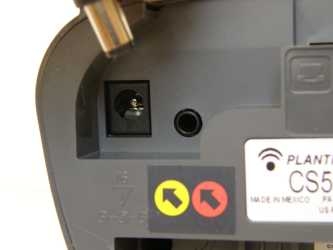
Step 4The last step is to unplug the AC power adapter for 5 seconds, then reconnect. You can do this by unplugging at the wall or the bottom of the CS70/CS70Nbase (as pictured).
|
 |